Techniques BABOK Guide v3, 10.42
Sequence Diagrams
In short A sequence diagram shows how the participants in a scenario (people, screens, services, external systems) exchange messages, in the order they happen. It lets you check that a flow is complete and logical before anyone builds it.
Based on: IIBA, BABOK® Guide v3, technique 10.42 “Sequence Diagrams”; Watermark Learning, BABOK v3 Study Tables (2016); A. Belin, Business Analysis: The Initiation Phase, Luxoft training slides (2005).
On this page
What it is#
A sequence diagram is part of UML, the Unified Modeling Language. In the BABOK® Guide it models the interactions between objects of a system in chronological order. An object is a specific instance of a class: “this booking”, not “bookings in general”. In business analysis work the participants are often roles, screens, or whole systems.
The notation has few elements:
- Lifeline: a participant, drawn as a box at the top with a dashed line running down. Time flows downwards.
- Activation box: a thin rectangle on a lifeline showing when the participant is busy handling a message.
- Message: an arrow from one lifeline to another. A synchronous call (filled arrowhead) means the sender waits for an answer. An asynchronous call (open arrowhead) means the sender carries on. A dashed arrow back is the reply.
UML also has frames for alternatives, optional steps, and loops (labelled alt, opt, and loop). Use them sparingly: one diagram should tell one story.
Belin’s UML course for IT business analysts compares workflow notations. Sequence diagrams are standard UML, encourage thinking in objects, and make it explicit who does what. Keeping one scenario per diagram also keeps the logic simple. The downside is that the style feels unnatural to many analysts and users, and you must decide not only who performs each action but also who triggers it.
When to use it#
- To specify how processes, components, or systems interact and in what order (BABOK task Specify and Model Requirements, 7.1).
- To validate the logic of a use case. One use case can be drawn as one or more sequence diagrams for a closer look.
- For integrations with external systems, where message order, waiting, and replies matter.
- When a defect or dispute is about who calls whom, and when.
Use something else when:
- the audience is business people. Sequence diagrams usually model system flows and can be too technical; use a swimlane process model or an activity diagram.
- the scenario has many branches. An activity diagram handles branching better.
- you need the life cycle of one object; use State Modelling.
- nobody needs it. The BABOK Guide notes that these diagrams take time to produce, so reserve them for flows that are new, risky, or disputed.
How to do it#
- Pick one scenario, usually one flow of a use case or one user story. Write its trigger and expected outcome.
- List the participants in order of first involvement, left to right: the initiating actor first, external systems on the right.
- Draw the lifelines.
- Add messages from top to bottom. Label each with a verb and the key data (“send status: ready, job ID”). Mark each as synchronous or asynchronous.
- Add replies wherever a sender waits for data or a confirmation.
- Add activation boxes to show who is working when.
- Add alternative paths in
altoroptframes only if they change the order of messages; otherwise draw a separate diagram. - Walk through it with developers and testers. For each message ask: does the sender have the data it sends? What happens if no reply comes?
- Link it to the use case, the interface specification, and the test cases.
Example#
The Workshop, a fictional chain of bike-repair workshops, models the scenario “Mechanic marks a repair complete and the customer is notified”. Participants, left to right: Mechanic, Workshop app, Repair service, Messaging provider (external), Customer.
| # | From | To | Message | Type |
|---|---|---|---|---|
| 1 | Mechanic | Workshop app | Mark job complete (job ID) | sync |
| 2 | Workshop app | Repair service | Set status to Ready (job ID) | sync |
| 3 | Repair service | Repair service | Look up customer’s contact preference | self |
| 4 | Repair service | Workshop app | Status updated | reply |
| 5 | Repair service | Messaging provider | Send “bike ready” message (address, text) | async |
| 6 | Messaging provider | Customer | Deliver message | async |
| 7 | Messaging provider | Repair service | Delivery receipt (delivered or failed) | async |
View as text
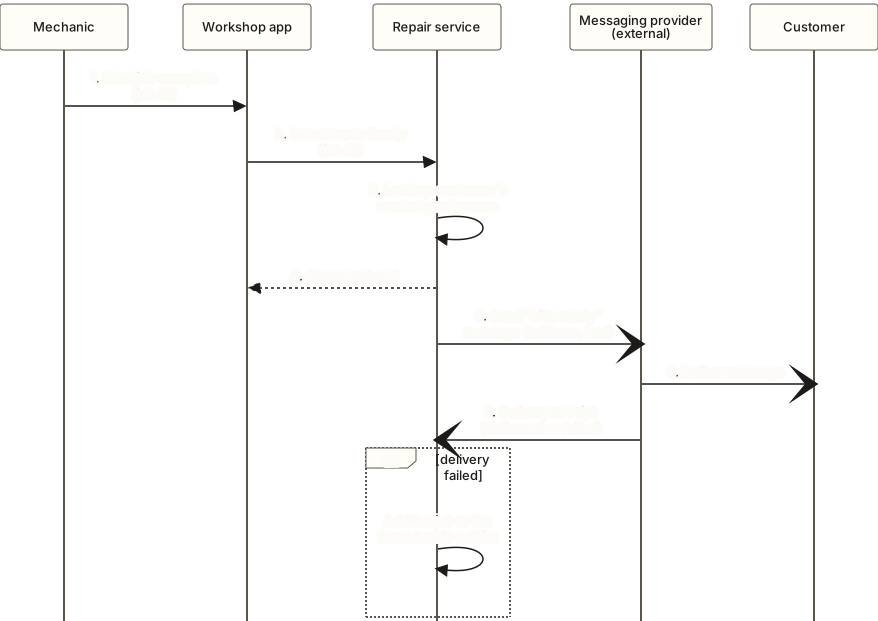
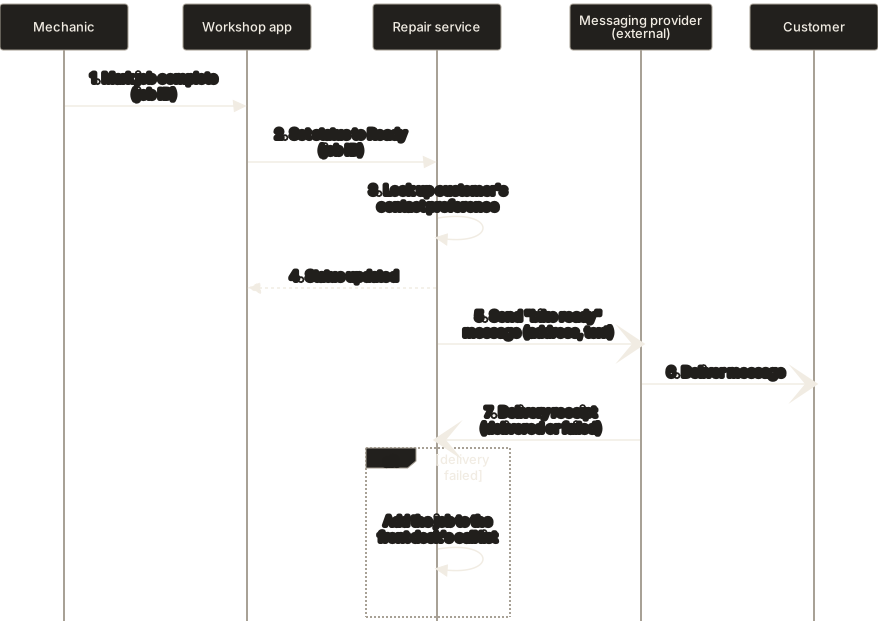
The diagram shows the seven messages from the table above, in the same order, plus the alt frame: if delivery failed, the Repair service adds the job to the front desk's call list.
An alt frame after message 7: if delivery failed, the Repair service adds the job to the front desk’s call list.
The walkthrough raised a question nobody had asked: should the mechanic see “Ready” before or after the message is sent? The diagram records the answer: immediately, because sending is asynchronous and must not hold up the mechanic.
Common mistakes#
- Several scenarios on one diagram → one scenario per diagram; branch only where the message order changes.
- Too technical for the audience → show business participants and business messages; leave method names to designers.
- No replies or failure paths → for every call to an external system, ask what happens if it fails or is slow.
- Drifting away from the use case → number messages so each maps to a use case step.
- Diagramming everything → spend the effort on complex, risky, or disputed flows.
- Unclear initiator → every message needs a sender with a reason to send it.
Template#
Scenario: <use case or story, flow name>
Trigger: <event>
Outcome: <what is true at the end>
Participants (left to right): <Actor>, <Screen>, <Service>, <External system>

| # | From | To | Message (verb + key data) | sync / async / reply / self |
|---|---|---|---|---|
| 1 |  |  |  |  |

Alternatives (alt / opt): <condition> -> <messages>
Open questions: <list>
Traces to: <use case step, interface spec, test case>
Checklist#
- The diagram covers exactly one scenario with a stated trigger and outcome.
- Every message has a sender, a receiver, a label, and a type.
- Calls that wait for an answer have replies.
- Failure of each external call is handled or listed as an open question.
- Messages map to use case steps or story acceptance criteria.
Sources and further reading#
- IIBA. A Guide to the Business Analysis Body of Knowledge (BABOK® Guide), version 3. International Institute of Business Analysis, 2015, technique 10.42 “Sequence Diagrams”.
- Watermark Learning. BABOK v3 Study Tables. 2016. (study aid for the BABOK Guide), technique 10.42.
- A. Belin. Business Analysis: The Initiation Phase (UML for IT business analysts), training slides. Luxoft, 2005 (comparison of workflow notations).