Techniques BABOK Guide v3, 10.35
Process Modelling
In short A process model is a diagram of how work actually gets done: who does each step, in what order, where decisions branch, and where work passes between people or systems. It gives stakeholders a shared picture to agree on, analyze, and improve.
Based on: IIBA, BABOK® Guide v3, technique 10.35 “Process Modelling”; Watermark Learning, BABOK v3 Study Tables, section 10.35; A. Belin, Business Analysis: The Initiation Phase (Luxoft training slides); D. Paul, D. Yeates, J. Cadle (eds.), Business Analysis (BCS), 2nd ed., ch. 8; A. P. Popov, Free Tools for Information Systems Design, section 1.1.
On this page
What it is#
Process modelling documents visually how work is done in an organization: who performs it and how the participants interact. A process model can set the context for a solution, show the current process or a desired future one, fix the sequence of activities, accompany a text description, and serve as the basis for process analysis.
The BABOK Guide lists several families of notation:
- Flowcharts and value stream maps;
- Data flow diagrams and UML (Unified Modeling Language) activity diagrams;
- BPMN (Business Process Model and Notation), a standard notation with a rich set of events and gateways;
- IDEF (Integrated Definition) models;
- IGOE diagrams, which show a process’s Inputs, Guides (rules and policies), Outputs, and Enablers (people, tools, systems);
- SIPOC and value stream analysis.
Which notation for whom#
Belin compares five notations for describing workflow: system flowcharts, swimlane workflow diagrams, sequence diagrams, activity diagrams, and BPMN. He rates the UML activity diagram as the most useful for IT business analysts: it is part of a standard, one diagram covers many situations, its symbols are simple, and it encourages thinking about work that happens in parallel. Sequence diagrams, in his view, are hard for business users to read, and BPMN is richer but needs training first.
The core activity-diagram elements are: a start node; actions (steps); arrows for the flow; decisions (diamonds) with guard conditions in square brackets on each outgoing path; merges, where alternative paths rejoin; events that the flow waits for; forks and joins for parallel work; an end node; and partitions, better known as swimlanes, one per participant.
The BCS book gives practical drawing conventions for swimlane diagrams: one lane per actor, which can be a person, a team, or an IT system; the customer’s lane at the top; time running left to right; a named event to start; task names in verb-noun form; and no vague verbs such as “manage” or “process”. It also separates three levels: the process (from trigger to result), the task (one actor, one time, one box), and the step (detail within a task, usually described in text rather than drawn).
If you work with Russian standards, Popov notes that GOST 19.701-90 defines the equivalent flowchart notation, which it calls schemes of algorithms and programs.
When to use it#
The study tables show the technique supporting a wide range of BABOK tasks: all of business analysis planning and monitoring (3.1–3.5), 4.2 Conduct Elicitation, 5.1 Trace Requirements and 5.2 Maintain Requirements, all of strategy analysis (6.1–6.4), 7.1 Specify and Model Requirements, and 8.4 Assess Enterprise Limitations.
Its strengths, per the study tables: most stakeholders read process models comfortably; they cope with many main, parallel, and alternative paths; they help identify stakeholder groups and areas for improvement; and they make roles, sequence, and handoffs explicit, which helps training, coordination, and compliance.
Limits and alternatives. The study tables also warn that newer delivery approaches may leave no time for process models; complex models become unwieldy and hard for one person to grasp; a diagram does not reveal problems without further analysis and discussion; and models go stale quickly where processes change often. For data movement, use Data Flow Diagrams; for message exchange between systems, Sequence Diagrams; for the life cycle of one object, State Modelling.
How to do it#
- Define purpose and audience: shared understanding, analysis, automation, training, or compliance. This decides the notation and the level of detail.
- Set the scope: trigger event, end result, process owner, what is in and out.
- Choose the notation: simple swimlanes for business audiences; BPMN when you need precise events and gateways; activity diagrams for teams already using UML.
- Gather facts through interviews, observation, document analysis, or a workshop.
- Draw the main path first, from start event to end, one lane per actor.
- Add decisions, alternatives, exceptions, and parallel work. Label every decision path with a guard condition.
- Annotate systems, documents, and business rules; keep step-level detail in text.
- Walk it through with the people who do the work, and correct it.
- Version it: owner, date, status, so readers know whether it is still current.
Example#
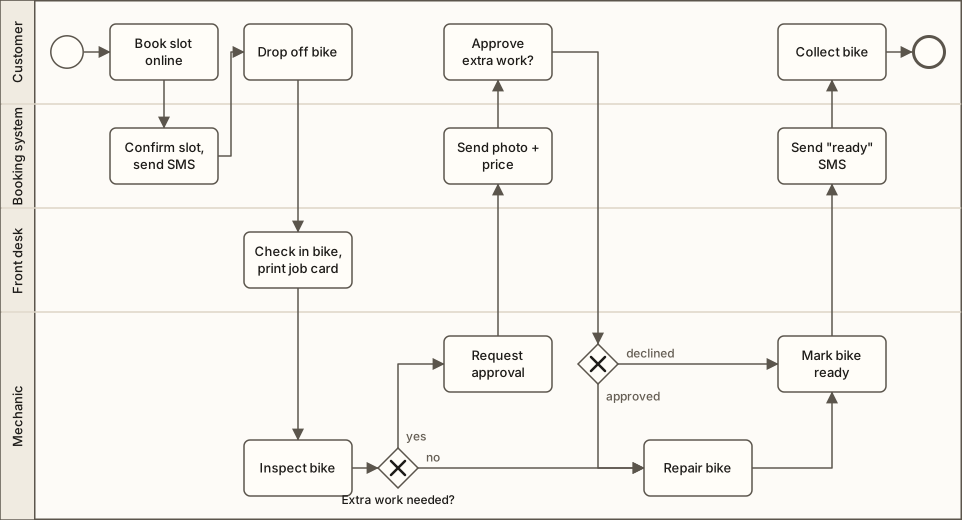
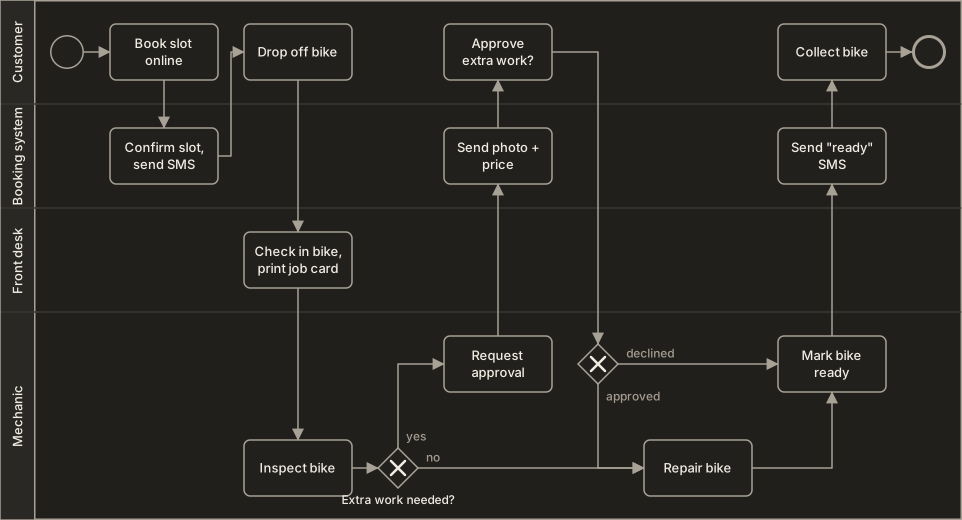
The Workshop, a fictional chain of 12 bike-repair workshops, models its future repair process, one lane per actor:
View as text
Customer        | Book slot online → Drop off bike ............ Approve extra work? → Collect bike
Booking system  | Confirm slot, send SMS ......................... Send photo + price → Send "ready" SMS
Front desk      | ............ Check in bike, print job card ................................
Mechanic        | ........................ Inspect bike → [extra work needed] Request approval
                |                                       → [no extra work] Repair bike → Mark bike ready
A second decision follows the approval request: [approved] leads to the repair, [declined] straight to “Mark bike ready”. Drawing it exposed a gap: nobody owned the case where the customer does not answer within a day. The team added a timer event and an exception path to the front desk.
Common mistakes#
- Mixing levels or one huge diagram → keep each diagram at one level; link to sub-processes.
- Drawing the procedure manual, not reality → check with the people doing the work.
- Vague task names (“Handle request”) → use a verb and a specific noun (“Check in bike”).
- Unlabeled decisions → put a guard condition on every outgoing path.
- Only the main path → add exceptions and parallel work.
- No owner or version → date it and assign an owner.
Checklist#
- Purpose, audience, and scope stated
- Notation suits the audience
- One lane per actor, including systems
- Start event and end result named
- Every decision path has a guard condition
- Exceptions and parallel paths included
- Validated with the people who do the work
- Owner, date, and version recorded
Sources and further reading#
- IIBA. A Guide to the Business Analysis Body of Knowledge (BABOK® Guide), version 3. International Institute of Business Analysis, 2015. Technique 10.35 “Process Modelling”.
- Watermark Learning. BABOK v3 Study Tables. 2016. (study aid for the BABOK Guide). Section 10.35.
- A. Belin. Business Analysis: The Initiation Phase (UML for IT business analysts), training slides. Luxoft, 2005. (Comparison of workflow notations; activity diagram elements.)
- D. Paul, D. Yeates, J. Cadle (eds.). Business Analysis, 2nd ed. BCS, The Chartered Institute for IT, 2010. Ch. 8 (swimlane diagrams).
- A. P. Popov. Free Tools for Information Systems Design (in Russian). Northern (Arctic) Federal University, 2012. Section 1.1.
- GOST 19.701-90, Unified System for Program Documentation: flowchart symbols and drawing rules.