Techniques BABOK Guide v3, 10.17
Decision Modelling
In short Decision modelling makes the logic of a repeatable business decision explicit: what the decision is, what information it uses, which rules apply and who has authority over them. The result is logic that business people can review and that developers can implement without guessing.
Based on: IIBA, BABOK® Guide v3, technique 10.17 “Decision Modelling”; Object Management Group, Decision Model and Notation (DMN) 1.1, sections 5, 6 and 8; K. Wiegers, J. Beatty, Software Requirements, 3rd ed., ch. 9; business analysis training materials.
On this page
What it is#
The BABOK Guide describes decision models as showing how data and knowledge combine to make a specific, repeatable decision, often alongside process models. Three elements matter: the decision, the information it uses and the knowledge (rules) it applies. It names three notations:
- Decision tables — when the outcome depends on combinations of values of a few inputs. Each row is a rule, each column an input, and the last column the result.
- Decision trees — when decisions follow one another in sequence; branches show the alternatives.
- Decision requirements diagrams — for networks of interdependent decisions.
The DMN view#
The OMG’s Decision Model and Notation (DMN) standard is the source of decision requirements diagrams. It separates two levels:
- Decision requirements: what is decided, from which inputs, depending on which other decisions. Business concepts are enough here. For much business analysis work this level alone is useful.
- Decision logic: exactly how each result is calculated, for example in decision tables.
A decision requirements diagram has four element types: a decision; a business knowledge model (reusable logic such as a rule set, decision table or predictive model); input data; and a knowledge source (the authority behind the logic, such as a policy, regulation or expert). They are linked by three kinds of requirement: information (data or a sub-decision flows into a decision), knowledge (a decision invokes a business knowledge model) and authority (a knowledge source governs a decision or model).
DMN expects models to serve three purposes, which can coexist in one project: describing how people make decisions, specifying requirements for automated decisions, and implementing executable decision services that a process can call.
Hit policies#
When more than one row of a decision table can match the same inputs, DMN requires the table to declare a hit policy:
- For a single result: Unique (overlaps not allowed), Any (overlaps allowed only if they give the same result), Priority (the highest-priority output wins) and First (the first matching row in order wins). The specification cautions against relying on First, because the meaning of the table then depends on row order.
- For multiple results: Output order, Rule order and Collect, optionally aggregated as a sum, minimum, maximum or count.
For an analyst, hit policies are a ready vocabulary for asking stakeholders what should happen when rules conflict, instead of leaving it to a developer or finding out in testing.
When to use it#
Use decision modelling when a decision is made often, follows rules, and those rules change or must be audited: eligibility, pricing, routing, approvals, fraud flags. The BABOK Guide notes that it simplifies discussion of complex rules, supports impact analysis and rule reuse, and suits automation and predictive analytics.
Skip it for simple decisions, where a table adds overhead, and for decisions that need human judgment case by case. It is one more notation people must learn, and it only works when the terms it uses are clearly defined, ideally in a glossary.
For choosing once between a few strategic options, use Decision Analysis instead.
How to do it#
- Name the decision as a question with a defined set of possible answers.
- Draw the requirements: input data, sub-decisions, business knowledge models and knowledge sources.
- Choose a representation for each decision’s logic: table, tree or a single sentence if it is trivial. Wiegers and Beatty recommend tables or trees over prose once conditions start to combine.
- Build the table: one column per input, outputs on the right, one rule per row. Use
-for “any value”. - Check completeness and overlaps. Every combination should hit a rule. Watch boundaries: Wiegers and Beatty warn against ranges like 1–5 and 5–10, where it is unclear which rule covers 5.
- Declare the hit policy explicitly.
- Test with real cases, including boundary values, and have the rule owner sign off.
- Link the decision to the process step that uses it, and agree who may change the rules.
Example#
The Workshop (a fictional chain of bike-repair workshops) wants online booking to decide automatically whether to ask for a deposit.
Decision requirements:
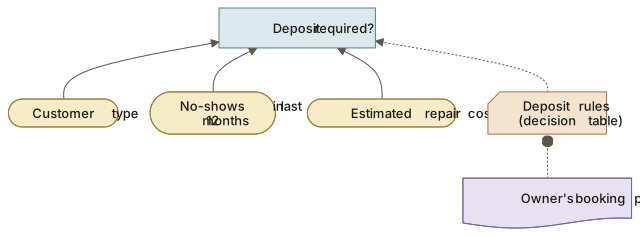
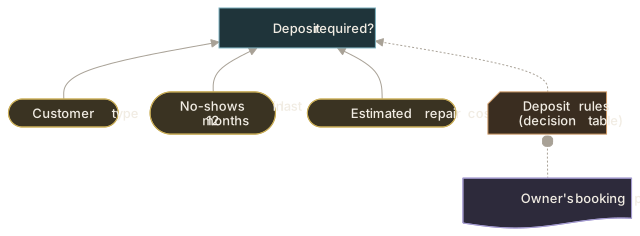
- Decision
- Input data
- Business knowledge model (decision table)
- Knowledge source
View as text
Decision: "Deposit required?"
  <- information: Customer type (input data)
  <- information: No-shows in last 12 months (input data, from booking history)
  <- information: Estimated repair cost (input data)
  <- knowledge:   Deposit rules (business knowledge model: decision table)
                     <- authority: Owner's booking policy (knowledge source)
Decision table (hit policy U, amounts in dollars, invented):
| U | Customer type | No-shows in last 12 months | Estimated cost | Deposit required |
|---|---|---|---|---|
| 1 | Registered | 0 | - | No |
| 2 | Registered | 1 or more | - | Yes |
| 3 | New | - | under 150 | No |
| 4 | New | - | 150 or more | Yes |
Later the owner adds: “Cargo bikes always need a deposit.” A new row for cargo bikes would overlap rule 1 and break the Unique policy. The analyst asks the owner to choose: add a bike-type column and split the rules, or switch to Priority with “Yes” ranked above “No”. The conflict is resolved in a meeting, not in code.
Common mistakes#
- Several decisions crammed into one table → model each decision separately and connect them in the requirements diagram.
- Gaps and overlapping ranges → test boundary values and declare the hit policy.
- Using First to hide conflicts → resolve the conflict or use Priority with explicit rankings.
- Encoding decisions as chains of process gateways → model the decision once and reference it from the process.
- Undefined input terms → define each input in the glossary or data dictionary.
- No rule owner → record the knowledge source and who approves changes.
Checklist#
- The decision is a question with a closed set of answers.
- All inputs, sub-decisions and knowledge sources are shown.
- Every input term is defined.
- The table is complete; boundaries are tested.
- The hit policy is declared.
- Real cases have been walked through with the rule owner.
- The process step that uses the decision is identified.
Sources and further reading#
- IIBA. A Guide to the Business Analysis Body of Knowledge (BABOK® Guide), version 3. International Institute of Business Analysis, 2015, technique 10.17 “Decision Modelling”.
- Object Management Group. Decision Model and Notation (DMN), version 1.1. 2016, sections 5 (introduction), 6 (decision requirements) and 8 (decision tables and hit policies).
- K. Wiegers, J. Beatty. Software Requirements, 3rd ed. Microsoft Press, 2013, ch. 9 (business rules, decision tables, overlapping ranges).
- Business analysis training materials (Strategy Analysis module: decision tables and decision trees).