Techniques BABOK Guide v3, 10.41
Scope Modelling
In short Scope modelling describes the boundary of a solution or of the analysis work: what is inside, what is outside, and what crosses the line. The result is a picture and a short list that stakeholders agree on, and that later change requests are checked against.
Based on: IIBA, BABOK® Guide v3, technique 10.41 “Scope Modelling”; business analysis training materials; K. Wiegers, J. Beatty, Software Requirements, 3rd ed., ch. 5; D. Leffingwell, D. Widrig, Managing Software Requirements.
On this page
What it is#
The BABOK® Guide treats scope models as the basis for drawing a line around the business analysis work and around the project. Scope is never just a list of features. It also covers what you deliberately leave out and the parties the solution deals with.
Business analysis training materials summarize the usual forms:
- Context diagram: a top-level data flow diagram. The whole solution is a single process; around it sit the external entities it exchanges data with.
- Events: things the solution must respond to. External events come from outside (a customer request, a message from a partner). Temporal events happen because of time (a monthly tax payment). For each event, ask what process is needed to handle it completely.
- Features: services the solution provides that meet one or more stakeholder needs. Features are high-level and are later detailed as functional and non-functional requirements. They are handy for early prioritization.
- Use case diagram: use cases, their relationships, and the actors that interact with them.
- Business process model: shows where the solution starts and stops within the work.
Wiegers and Beatty add practical advice. Pick one representation rather than drawing all of them. A context diagram shows the system as one circle, external entities as rectangles, and flows as arrows, and deliberately hides the inside. What is missing also carries information: an entity left off the diagram is one the system does not deal with. When systems are linked indirectly, through shared data, an ecosystem map shows the wider landscape. They also recommend listing limitations and exclusions explicitly, so the same debate does not reopen every month.
Leffingwell and Widrig make the boundary a step of problem analysis: divide the world into the system and whatever interacts with it. Anything outside that interacts with the system is an actor, and finding the actors is a key analysis step.
When to use it#
- At the start of an initiative, before detailed elicitation.
- When a change request arrives and you must decide whether it is in scope.
- When planning business analysis work: the boundary tells you which stakeholders, processes, and systems to cover.
- In the BABOK Guide it supports tasks such as Trace Requirements (5.1) and Define Requirements Architecture (7.4). It works for new solutions and for changes to existing ones.
Limits: a scope model says nothing about the inside. It needs further analysis, so follow it with process models, use cases, data models, or user stories. To explain why the boundary sits where it does, pair it with a problem statement or business case.
How to do it#
- Name the boundary you are modelling: the business analysis effort, the whole solution, or one release.
- Write the goal the scope serves, in one or two sentences. Every in-scope item should trace back to it.
- List external entities: people, organizations, and systems outside the boundary that send or receive something.
- List events, external and temporal, with the response each one requires.
- Draw the context diagram with labelled flows in both directions.
- List features at a high level and sort them into “this release”, “later”, and “out of scope”.
- Walk through it with stakeholders. Check that each business objective is covered and that each flow has an owner on both sides.
- Baseline it, trace requirements back to it, and use it to filter new requests.
Example#
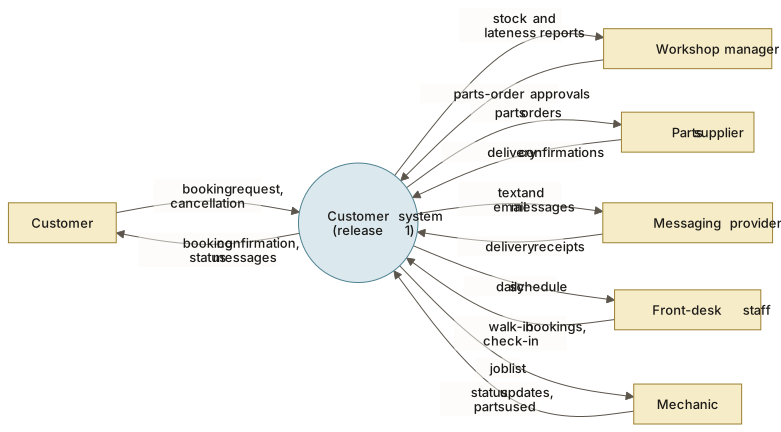
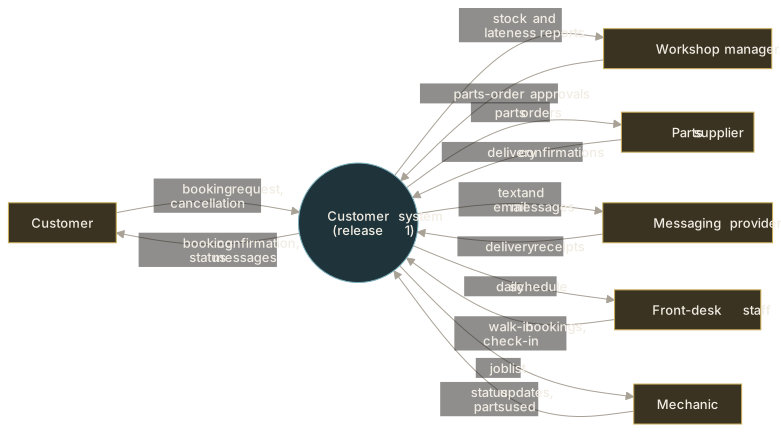
The Workshop, a fictional chain of bike-repair workshops, scopes release 1 of its customer system. The context diagram, written as a table:
| External entity | Into the system | Out of the system |
|---|---|---|
| Customer | Booking request, cancellation | Booking confirmation, status messages |
| Front-desk staff | Walk-in bookings, check-in | Daily schedule |
| Mechanic | Status updates, parts used | Job list |
| Workshop manager | Parts-order approvals | Stock and lateness reports |
| Parts supplier | Delivery confirmations | Parts orders |
| Messaging provider | Delivery receipts | Text and email messages |
- External entity
- The customer system (release 1)
View as text
The diagram shows the same flows as the table above: what each external entity sends into the system and what it receives.
Event list:
| Event | Type | Required response |
|---|---|---|
| Customer requests a slot | External | Offer free slots, confirm the booking |
| Mechanic finishes a repair | External | Tell the customer the bike is ready |
| Supplier confirms a delivery date | External | Update the expected completion date |
| End of each working day | Temporal | Send reminders for tomorrow’s bookings |
| First day of the month | Temporal | Produce the parts usage report |
Release 1 boundary:
- In scope: online booking, status notifications, parts ordering with one supplier.
- Later: online payment, a second supplier.
- Out of scope: loyalty programme, staff rostering, accounting.
The accounting system is absent from the diagram on purpose. The owner confirmed that invoicing stays in the existing tool, which settled a question that had come up in every meeting.
Common mistakes#
- Drawing the inside on the context diagram → keep a single process in the middle; detail belongs in other models.
- No out-of-scope list → write exclusions down, as Wiegers and Beatty recommend.
- Mixing levels → separate product vision, project scope, and release scope.
- Forgetting temporal events → ask what must happen at a set time each day, month, or year.
- Treating the scope model as the specification → it is a frame, not the detail.
- Drawing every notation at once → choose the one your stakeholders read most easily.
- Modelling scope alone → a boundary stakeholders have not agreed is not a boundary.
Template#
Scope of: <BA effort / solution / release>
Goal: <one sentence>

| External entity | Into the system | Out of the system |
|---|---|---|

| Event | External / Temporal | Required response |
|---|---|---|

In scope: <feature>, <feature>
Later: <feature>
Out of scope: <item> (reason: <why>)
Assumptions and constraints: <list>
Agreed by: <roles>, <date>
Checklist#
- The boundary type (BA work, solution, release) is stated.
- Every external entity has at least one flow, and every flow is labelled.
- Both external and temporal events are listed with responses.
- Out-of-scope items are written down with reasons.
- Key stakeholders have reviewed and agreed the model.
Sources and further reading#
- IIBA. A Guide to the Business Analysis Body of Knowledge (BABOK® Guide), version 3. International Institute of Business Analysis, 2015, technique 10.41 “Scope Modelling”.
- Business analysis training materials, module on Requirements Life Cycle Management (forms of scope models).
- K. Wiegers, J. Beatty. Software Requirements, 3rd ed. Microsoft Press, 2013, ch. 5 (context diagram, ecosystem map, limitations and exclusions).
- D. Leffingwell, D. Widrig. Managing Software Requirements: A Unified Approach. Addison-Wesley, 2000 (problem analysis: system boundary and actors).